NextStop
A highway companion that turns the exits ahead of you into a short, honest list of places worth stopping.
Every highway sign tells you what is at the exit. None of them tell you whether it is worth stopping.
Overview
On a long highway drive, the decision to stop is made in a very small window. You see a blue services sign, you have thirty seconds to decide, and then the exit is behind you.
The tools available in that window are poor. Maps are built for destinations, not for the exits between them. Searching “coffee near me” returns places behind you, places across the median, and places fifteen minutes off the highway, all ranked by straight-line distance that has nothing to do with driving.
NextStop reframes the problem. The driver is not asking “what is near me?” They are asking:
“Should I take this exit, or keep going?”
So the app is organized around exits, ordered by minutes ahead, with every piece of information expressed in the unit a driver actually cares about: time.
What I Focused On
This project was less about mapping and more about decision support at a glance. A driver cannot read, filter, or compare. They can glance, recognize, and tap once.
I concentrated on:
- Exits, not pins, as the primary unit of information
- Minutes ahead instead of miles or straight-line distance
- Honest detour cost: how much time a stop really adds to the trip
- Direction awareness, so the app only ever shows what is reachable ahead
- A near-zero setup flow that works from the passenger seat
- Finding one exit that satisfies several needs at once
Product & UX Decisions
Start with one tap
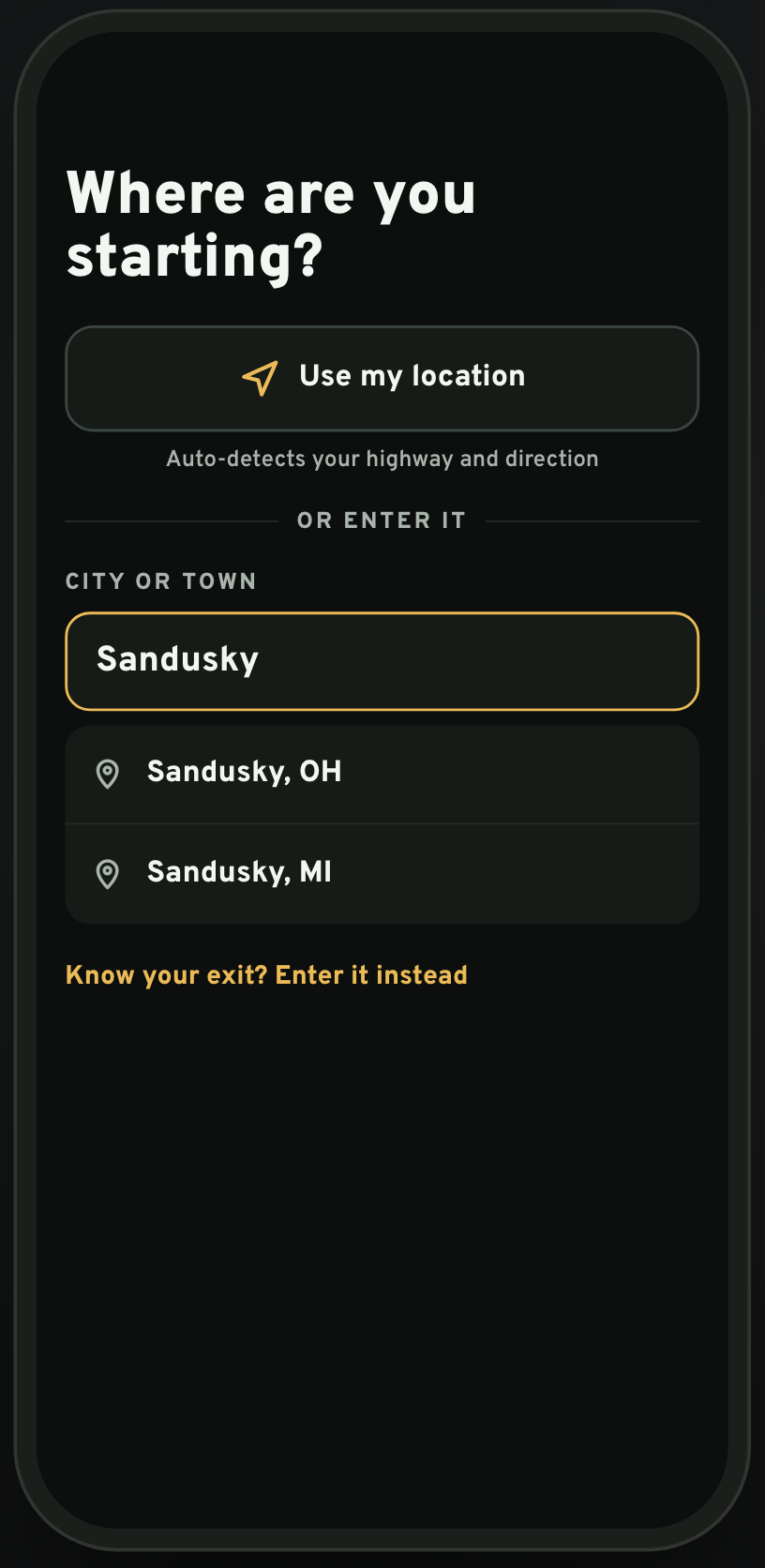
The first screen asks a single question: where are you starting? One tap on “Use my location” detects the highway and the direction of travel, and the app is ready.
Two fallbacks exist for planning ahead or for a passenger helping out: type a town, or type an exit number if you already know it. Nothing else is asked. There are no accounts, preferences, or onboarding screens between the driver and the list of exits.
“Ahead” as the home screen
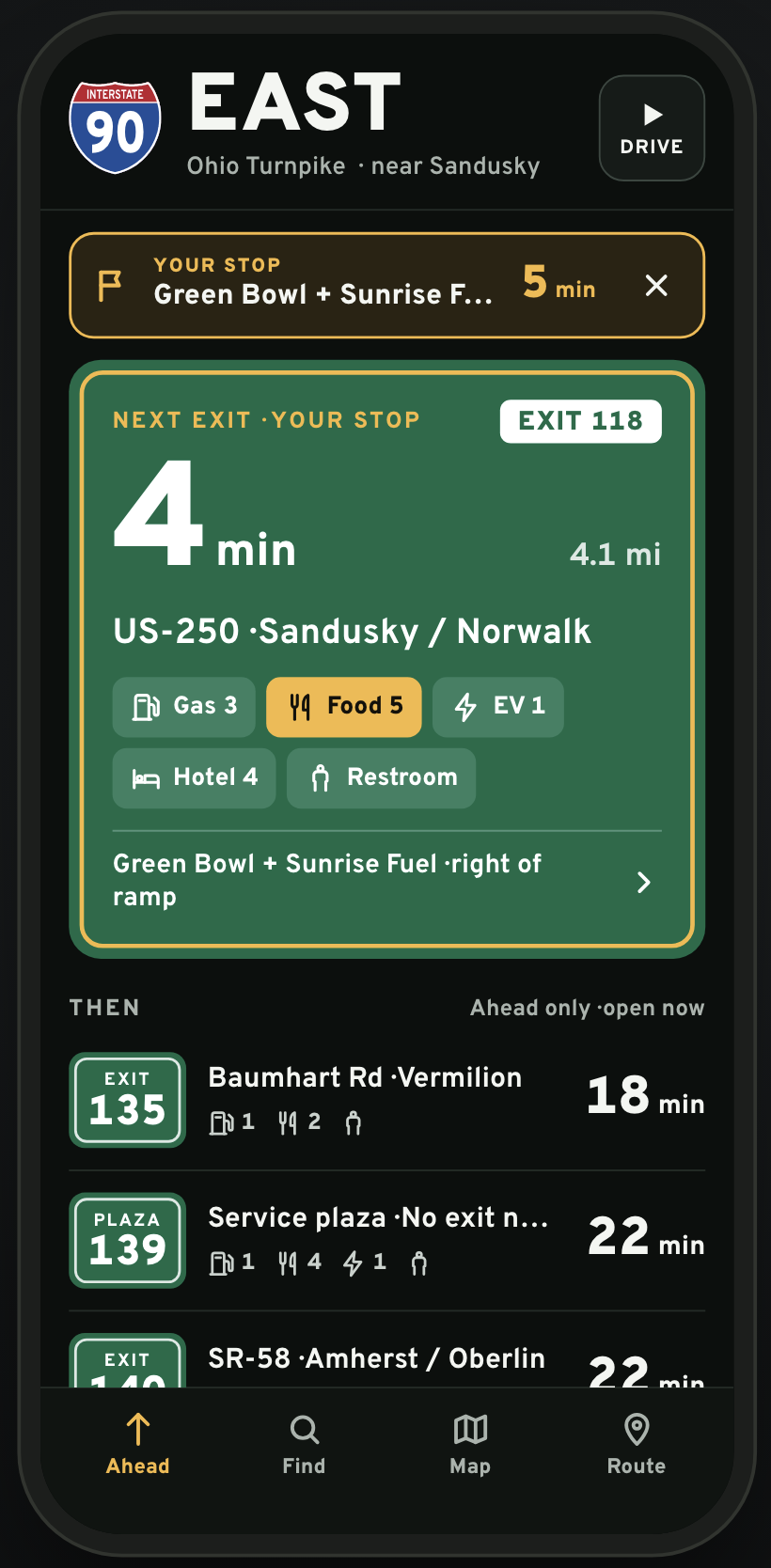
The main surface is a list of upcoming exits, nearest first, each showing minutes away and a compact count of what is there: gas, food, EV charging, hotels, restrooms.
The next exit is intentionally oversized. The number of minutes is the largest element on the screen, because that is the one fact that determines whether the driver needs to decide right now or can relax for a while.
Two defaults keep the list honest:
- Ahead only. Exits behind the driver and businesses on the other side of the highway never appear.
- Open now. A restaurant that closed an hour ago is not an option, so it is not shown.
When the driver picks a stop, it becomes a persistent banner at the top of the screen with a countdown in minutes, so the app can be put down until the exit is close.
Everything measured from the ramp
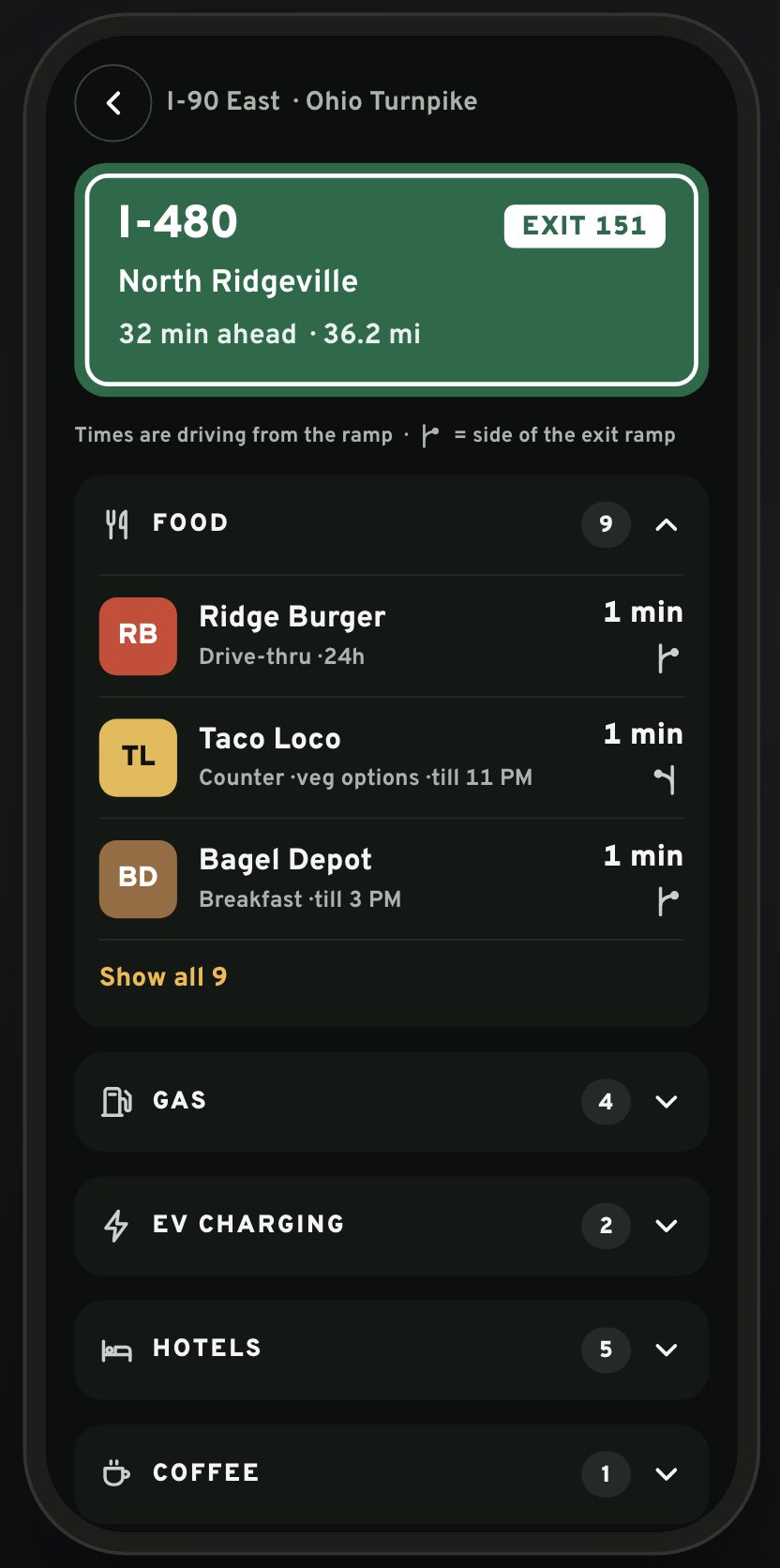
Opening an exit shows its businesses grouped by category, with two details that most map apps leave out: the driving time from the ramp, and which side of the ramp the business is on.
A gas station that is one minute to the right of the ramp is a fundamentally different stop from one that is one minute away on the far side of a divided road. The side-of-ramp glyph is small, but it answers the question a driver asks the moment they come off the highway: which way do I turn?
Detour cost, stated plainly
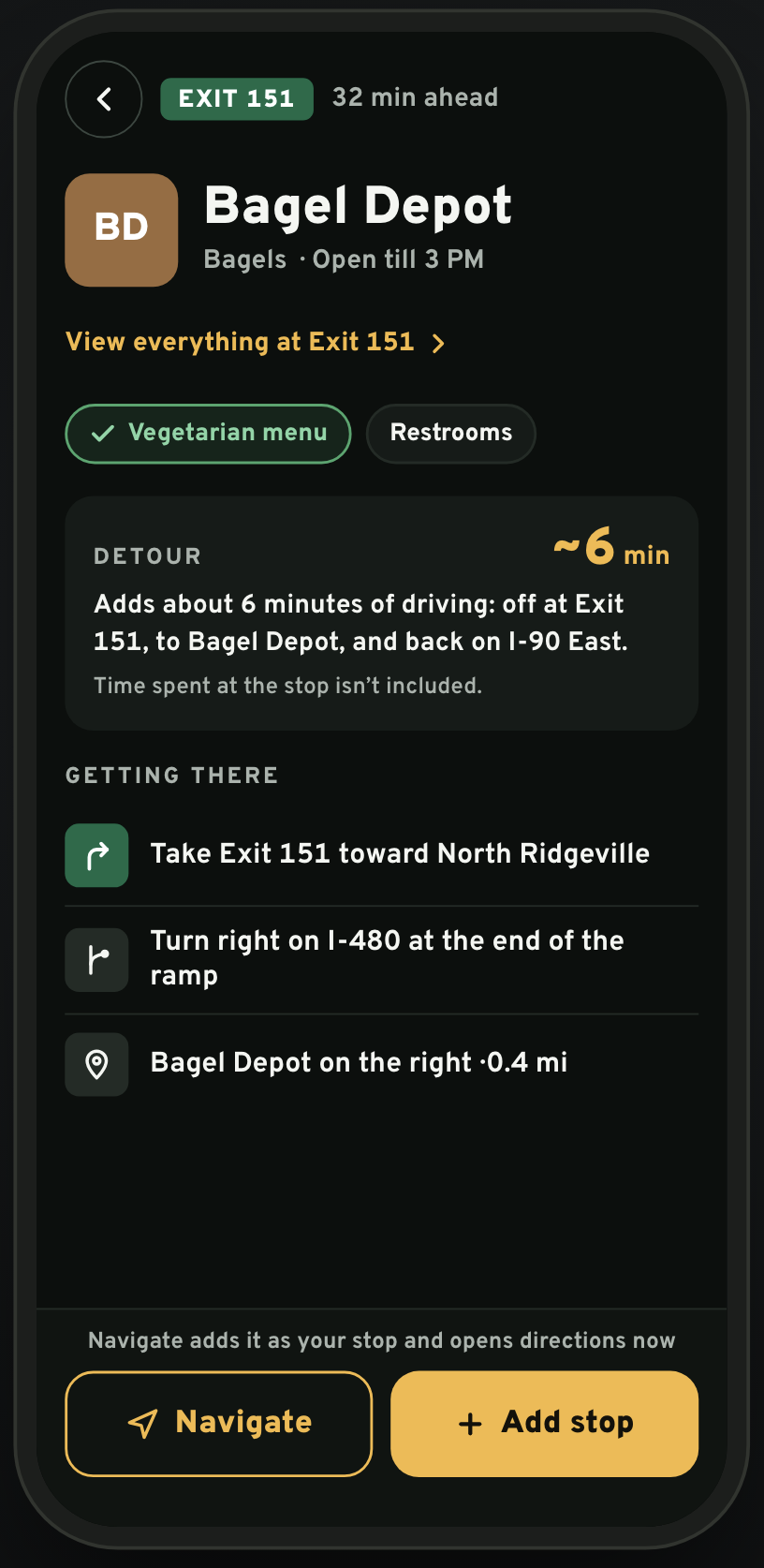
Every business page leads with the number that matters: how much driving the stop adds. The detour is computed as the whole loop, off the highway, to the door, and back on in the same direction, and the app says clearly that time spent at the stop is not included.
Below it, the directions are reduced to the three or four steps that happen between the ramp and the parking lot. The driver does not need turn-by-turn for the whole trip. They need to know “take the exit, turn right at the end of the ramp, it is on the right.”
Two actions close the page. Add stop sets it as the current stop and returns to the Ahead list. Navigate does the same and opens directions immediately.
Find the nearest one of something
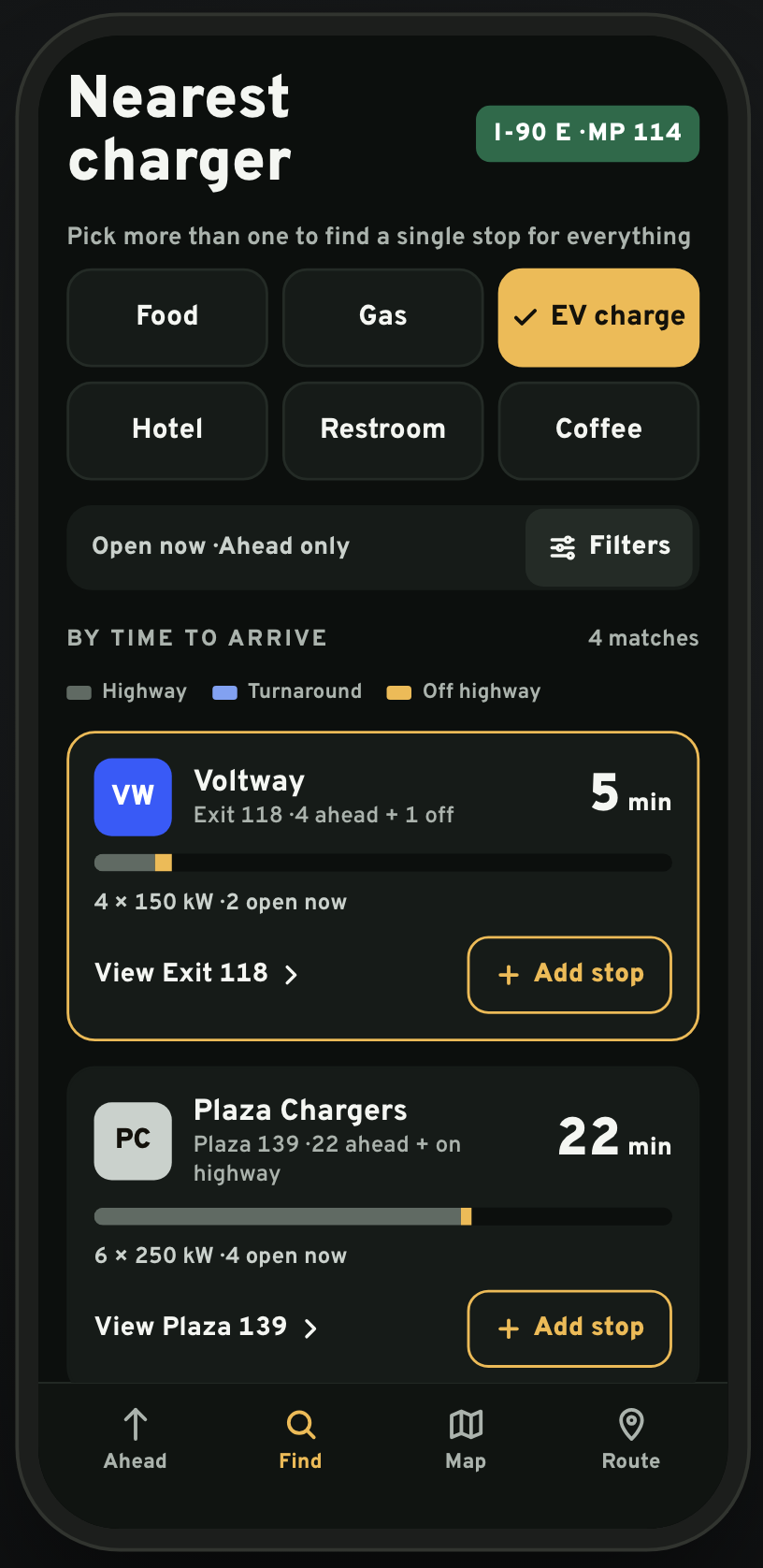
The Find tab answers a more specific question: where is the nearest charger, or coffee, or restroom? Results are sorted by total time to arrive, and each result shows how that time breaks down into highway driving, any turnaround, and off-highway driving.
The breakdown exists because “five minutes away” can mean two different things. Four minutes of highway plus one minute off the ramp is an easy stop. Two minutes of highway plus three minutes of surface streets, through a turnaround, is not. A small segmented bar makes the difference visible without a single word.
For EV charging specifically, the app surfaces the details a driver needs to choose: number of stalls, power, and how many are open right now.
One stop for everything
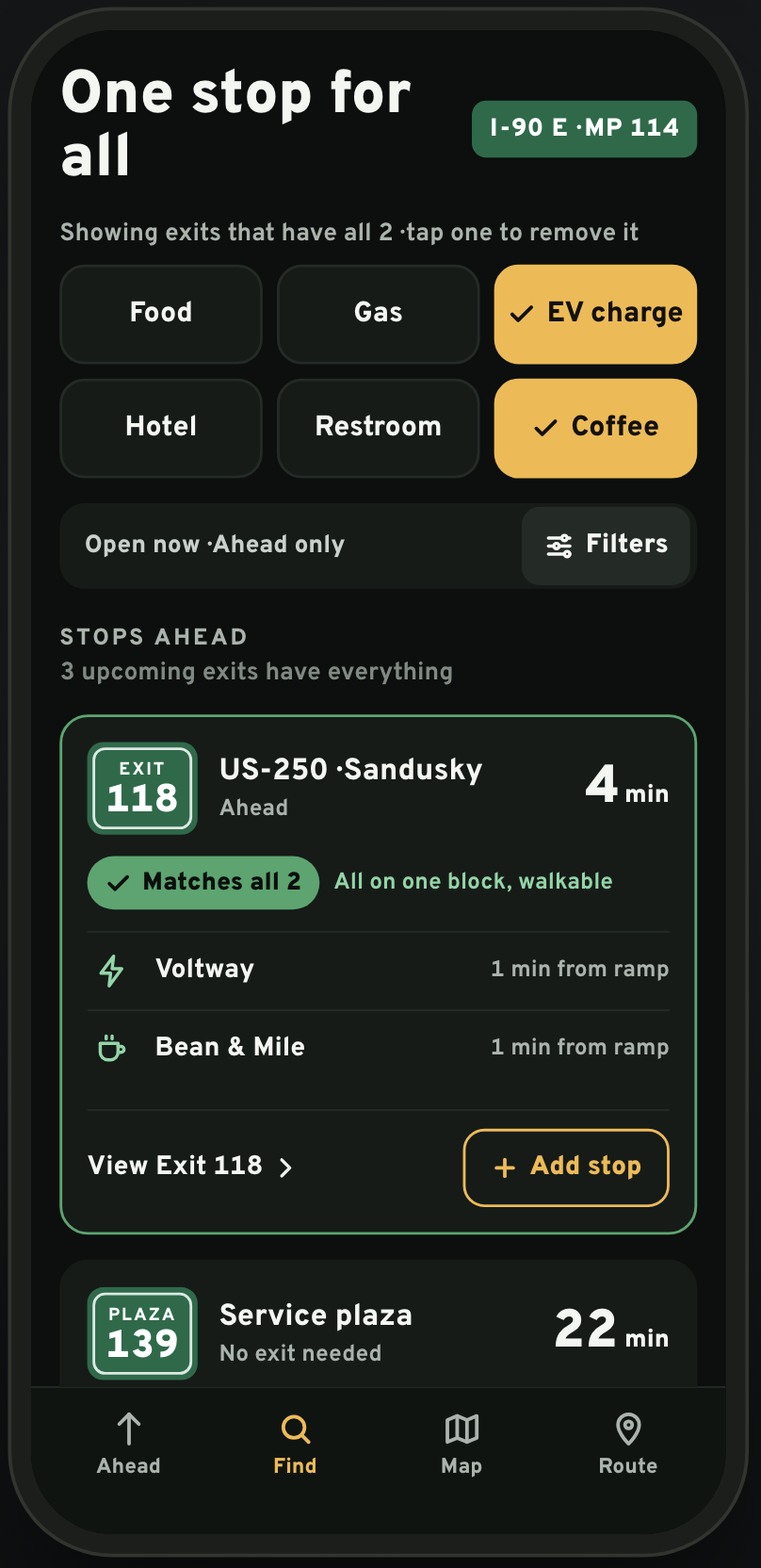
The most useful behavior in the app comes from selecting more than one category. Pick EV charge and coffee together and the Find tab switches from “nearest charger” to “one stop for all”: exits that have everything you selected.
This mirrors how people actually plan a stop. Nobody wants to charge at one exit, get coffee at the next, and find a restroom at a third. The app also notes when the matching businesses are on one block and walkable, which turns a thirty-minute charge into a usable break instead of a wait in the car.
Visual & Interaction Design
The visual language borrows directly from the road:
- Highway-sign green for exits and service plazas
- Amber for the driver’s own selections and the current stop
- A near-black background that stays readable in a phone mount at night
- Oversized numerals for minutes, so the key fact reads from arm’s length
- Exit and plaza badges shaped like the signs they refer to
The goal was for the screen to feel like an extension of the signage the driver is already reading, not like a map app with a dark theme.
Interaction principles
- Every screen has one dominant number and one primary action
- Tap targets sized for a hand that is not looking at the phone
- Lists are short by default, with “show all” for the rare case
- Selection state uses color and a check mark, never color alone
- Nothing scrolls horizontally, and nothing requires precise gestures
System Thinking
The interface looks simple because most of the work happens underneath it. To present a trustworthy list of exits, the app has to know:
- Which highway the driver is on and in which direction, from a noisy location signal
- The ordered sequence of exits and service plazas in that direction
- Which businesses are reachable from each ramp, on which side, and how long the loop back to the highway takes
- Opening hours relative to the arrival time at that exit, not the current time
- Live charger availability for EV stops
The central modeling decision was to treat the exit as the unit of the data model, with businesses attached to exits rather than floating on a map. Once that is in place, ordering by minutes ahead, filtering to one direction, and finding an exit that satisfies several needs all become straightforward queries instead of geometry problems.
Trade-offs
This portfolio version intentionally uses:
- A curated corridor along I-90 in northern Ohio, rather than nationwide coverage
- Representative businesses, charger counts, and hours
- Simulated position and progress along the route
…instead of live national data feeds.
The goal was prioritizing:
- The glanceable information hierarchy
- The detour and side-of-ramp model
- The multi-need “one stop” interaction
- Driving-context readability
…over breadth of coverage.
Why this approach
One well-modeled stretch of highway demonstrates the product idea more convincingly than thin, uneven data across the whole country would.
Result
NextStop became an exercise in answering a single question extremely well. Every design choice, from the oversized minute count to the side-of-ramp glyph, exists to help a driver decide in the few seconds they have.
The project reflects my interest in products where:
- The information architecture matches how people actually think
- The unit of measurement is chosen for the user, not the data source
- Context, in this case a moving car, shapes every interaction decision
- A small number of honest numbers beats a large number of options
— Dan Thoreson